
Structure Prediction
RayMol includes an on-device structure prediction engine powered by Apple Silicon MLX. You can fold individual protein sequences or multi-chain complexes directly in the viewer without sending structural data to cloud prediction APIs or manually exporting and importing coordinate files.
Open the prediction bar by choosing Tools ▸ Enter Predict Mode or pressing ⌃P.
Available predictors
Section titled “Available predictors”RayMol registers structure predictors through a unified model registry:
boltz2(default): Affine int8-quantized Boltz-2 model (~0.5 GB weight download). Balances low memory usage with high structural fidelity. Available on both macOS and iOS.boltz2-bf16: Unquantized dense bfloat16 Boltz-2 weights (~1 GB). Produces identical tokenization and model architecture at twice the disk (~0.5 GB → ~1 GB), about 63% more peak memory and ~20% slower, with no demonstrated accuracy gain over int8 on-device. macOS only — it is refused on iPhone/iPad because the on-device memory guard is calibrated against the int8 pack.protenix-base-int8and five sibling packs —protenix-{base,v2}-{int8,fp16,bf16}, 225–610 MB depending on the pack — AlphaFold3-class predictor supporting single chains and complexes with a confidence head. macOS only. Typingprotenixon the command line is a shorthand forprotenix-v2-int8; it is not itself a selectable id.
Predictor weights are not bundled into the base app download to keep the initial installer small. On first run with any predictor, RayMol downloads the pinned weight bundle from GitHub releases into a local on-device cache.
Inputs and setup
Section titled “Inputs and setup”The docked Predict bar accepts:
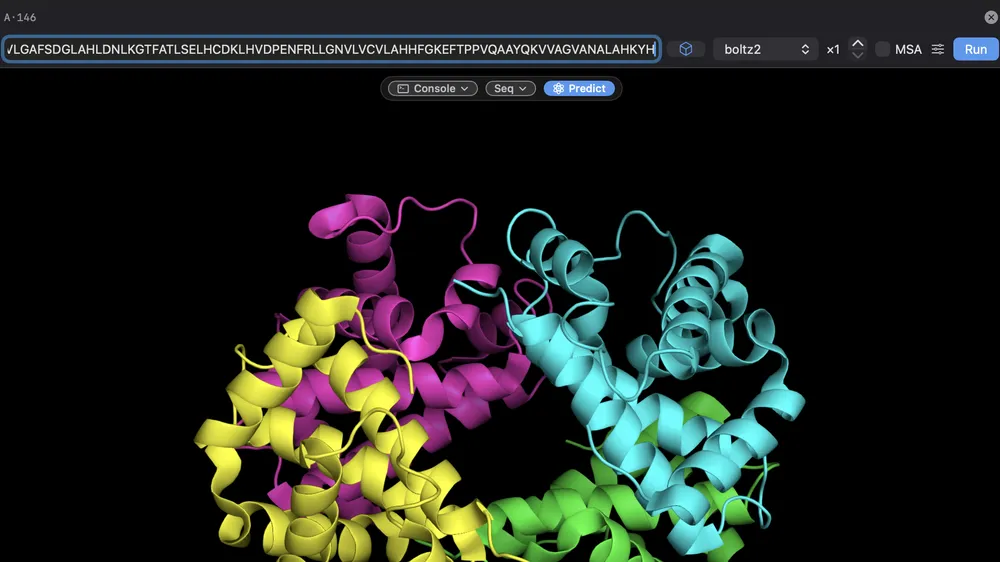 The Predict bar, docked above the viewport.
- Sequence: Raw one-letter amino acid sequences (e.g.
MKTII...). Separate multiple chains with a forward slash/(e.g.SEQ1/SEQ2). A comma cannot be used — the command parser reads it as an argument separator. - Selection: Any active PyMOL selection (such as
seleorchain A). RayMol extracts the contiguous amino acid sequences and chains automatically. - Loaded object: Click the cube menu beside the input field to choose any molecule currently in the session.
Predictor options
Section titled “Predictor options”In the main Predict bar:
- Model selector: lists every predictor this device can run — on macOS
boltz2,boltz2-bf16and the sixprotenix-*packs; on iPhone/iPad onlyboltz2. - Model count (
×N): Number of independent sample models to generate (default1, up to20). Multiple models are saved as separate states of a single result object. - MSA checkbox: Toggle multiple sequence alignment retrieval. Disabled when the selected model does not support external MSAs.
Click the sliders button (Advanced options) to expose:
- Recycling steps (
recycle): Number of recycling iterations (default3, range 1–10). - Diffusion steps (
diffuse): Number of reverse-diffusion sampling steps (default200, range 10–500). - Random seed (
seed): Set an explicit integer for reproducible sampling, or leave onautofor a randomized run. - MSA depth (
depth): Maximum alignment sequences passed to the featurizer (leave onautoor customize). - MSA mode (
mode): Alignment filtering strategy (env,all,env-nofilter,nofilter). - MSA server (
server): Choose between the public ColabFold server or any custom private server. - Result name (
name): custom PyMOL object name for the output (defaults to<predictor>_prediction_<digest>, e.g.boltz2_prediction_f2b2e116; re-folding the same sequence with the same method appends another model to that object).
Multiple sequence alignments (MSA)
Section titled “Multiple sequence alignments (MSA)”Structure predictors achieve higher accuracy when guided by multiple sequence alignments. RayMol can query ColabFold MSA servers directly from the interface:
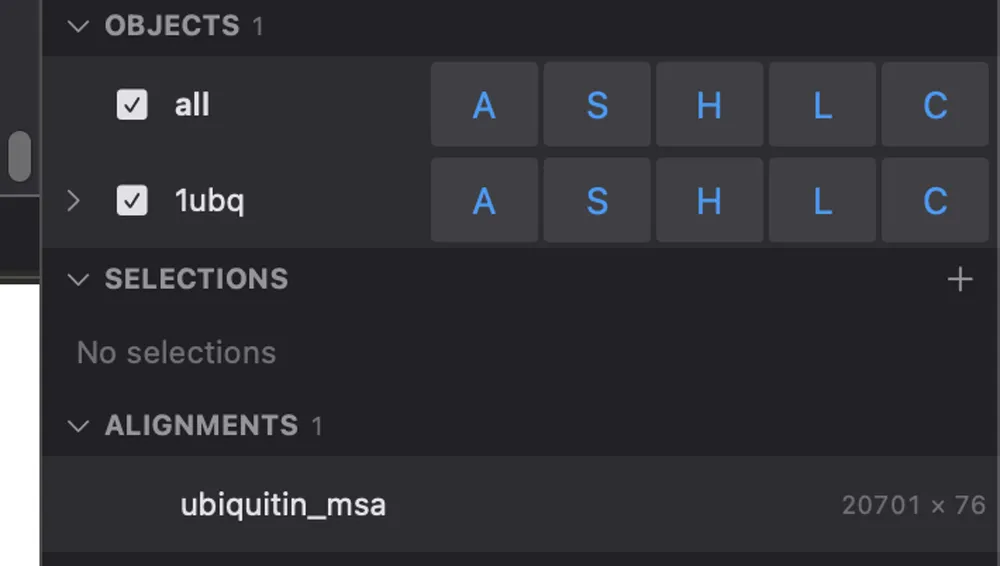 Retrieved alignments are listed in the Objects tab under ALIGNMENTS.
- Enable the MSA toggle on the Predict bar.
- Under MSA for:, toggle which individual chains should receive an alignment. Mixed queries are supported: for instance, you can query an alignment for a natural target chain while leaving a designed synthetic chain single-sequence.
- Choose the server in Advanced options or the MSA server picker.
Configure MSA servers
Section titled “Configure MSA servers”You can configure your own private MMseqs2 / ColabFold server endpoint (for example, inside an institutional intranet):
- Open the Server dropdown and choose Edit… or click + (Add MSA server).
- Enter the server URL and choose whether it becomes your default (used by new
sessions and by
msa_searchin the console). Picking a server from the dropdown without that option applies to this session only. - From the console,
msa_server https://your-server.examplesets and saves the default server (see the command reference).
Progress tray and execution
Section titled “Progress tray and execution”Click Run to submit the job. Prediction runs asynchronously in the background without freezing the PyMOL rendering loop or blocking user interaction.
The progress tray tracks running predictions and weight downloads.
The floating Progress Tray displays active and queued tasks:
- Weight downloads: Displays download progress and byte counts. If a download is cancelled or fails, RayMol discards partial bytes cleanly.
- Active job phases: The progress bar advances through
featurize,load,trunk,diffusionandwrite. Weight downloads and alignment searches are reported separately — the download as its own tray card, the MSA search in the Predict bar itself. - Countdown timer: Displays remaining time for the current phase (e.g.
this phase: 2 min left). - Cancel: Click the Cancel button on any card to abort execution.
- Failure retention: Failed jobs remain visible in the tray with an error diagnostic so you can inspect what went wrong, adjust settings, and retry.
- Screen awake (iPhone/iPad): While a prediction is running RayMol keeps the screen from dimming, because a suspended app loses GPU access and the run with it. Switching apps or locking the device still ends the fold. On macOS no sleep assertion is taken.
Results and confidence metrics
Section titled “Results and confidence metrics”When inference finishes, the predicted structure loads into PyMOL as an object (with states corresponding to the requested model count):
- pLDDT confidence: Per-residue confidence scores ($0$–$100$) are stored with the object. Higher values indicate higher local confidence.
- PAE matrix: Predicted Aligned Error matrices (in Ångströms, $0$–$32$ Å) are stored per model.
- Interface metrics: For multi-chain complexes, interface confidence scores
such as
ipae,ipsae, andmin_ipsaeare computed.
These metrics are recorded by the Boltz-2 predictors. Protenix currently reports
pLDDT only through the B-factor column (colour it with spectrum b); it stores
nothing in the metric store yet.
To color the result by confidence:
metrics_color plddt, boltz2_prediction_f2b2e116For detailed inspection, export, and cross-model comparison of confidence numbers, see the Metrics guide.
Size limits and performance
Section titled “Size limits and performance”Inference memory scales quadratically with sequence length. RayMol enforces an internal memory preflight before initiating model allocation:
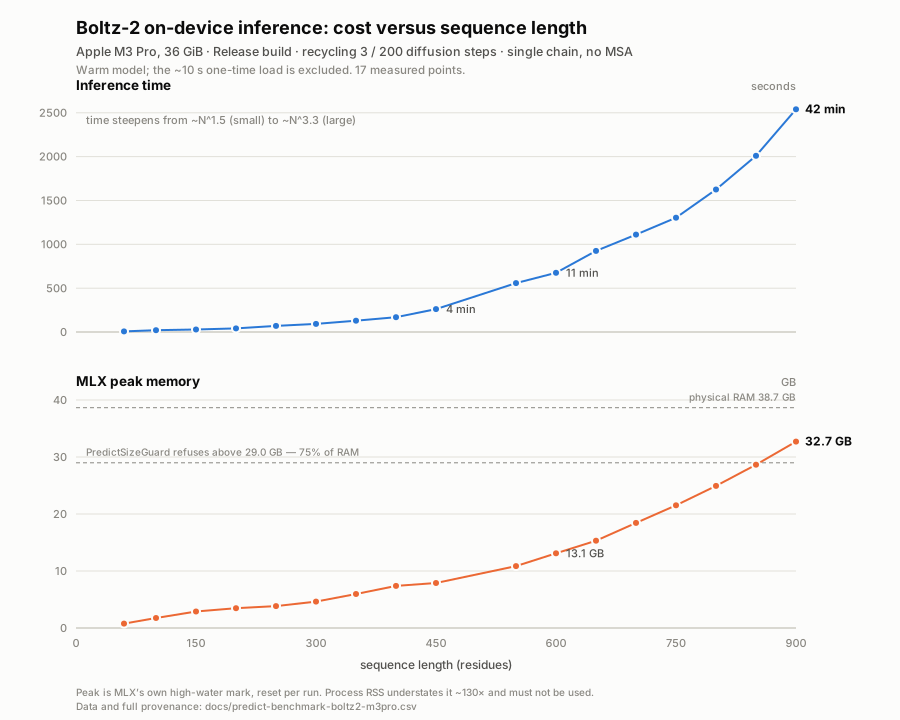 Boltz-2 (int8) time and peak memory by length on an M3 Pro, single sequence.
- If the estimate lands between 50% and 75% of the memory budget RayMol warns before running and offers Run anyway or Cancel. Above 75% the run is refused and names the largest input that would fit. Hard ceilings apply as well: 900 residues on macOS and 164 on iPhone/iPad for Boltz-2, 700 (base) or 550 (v2) residues for Protenix.
- Benchmarked timings on an Apple M3 Pro (12-core, 36 GiB RAM) using
boltz2(int8, 3 recycling steps, 200 diffusion steps):- 117 residues: ~14.5 s (peak memory ~0.6 GB).
- 200 residues: ~41 s (~3.5 GB).
- 400 residues: ~2.8 min (~7.4 GB).
- 600 residues: ~11 min (~13 GB).
Single-sequence predictions complete rapidly; complex multi-chain systems with deep MSAs require more memory and runtime.
Related workflows
Section titled “Related workflows”- Learn how to select specific residues and chains in Selecting.
- Redesign sequences for predicted backbones in Sequence Design.
- Query and export stored confidence scores in Metrics.
- View scripting options in Commands Reference.