
Rendering & Export
RayMol combines PyMOL’s core molecular engine with a real-time Apple Metal rendering pipeline. The Display tab in the inspector provides direct control over hardware-accelerated ray tracing, shadows, ambient occlusion, outlines, transparency, and photographic tone mapping.
Real-time Metal rendering
Section titled “Real-time Metal rendering”Open the Display tab in the inspector. Its Scene settings are grouped into Canvas, Camera, Lighting, Shadows & AO, Metal optimization, Effects and Quality. RayMol’s Metal pipeline evaluates lighting, shadows, and screen-space or ray-traced effects interactively as you orbit, pan, and zoom.
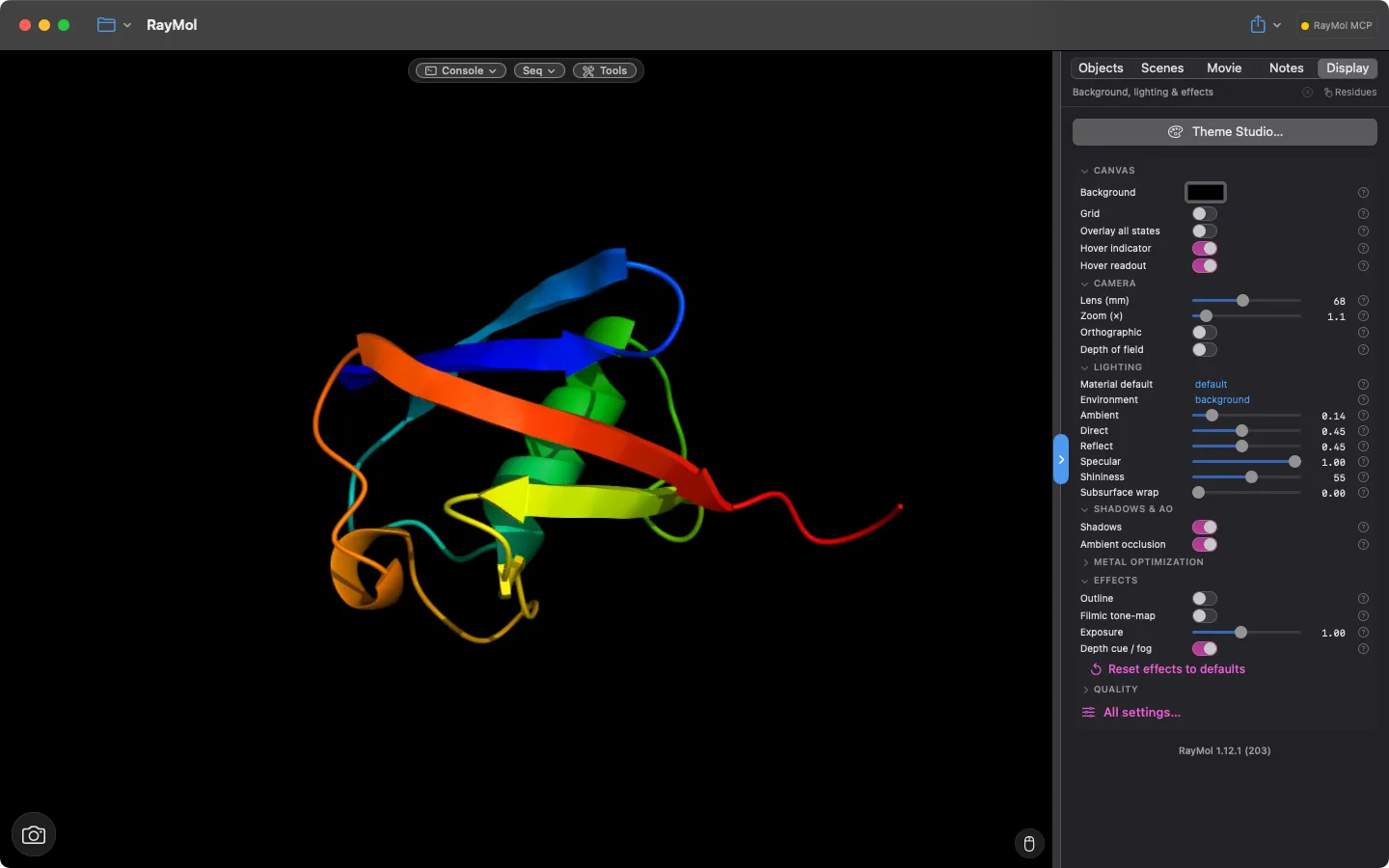 The Display tab: canvas, camera, lighting, shadows & AO and effects controls.
Hardware ray tracing
Section titled “Hardware ray tracing”Ray tracing is on by default on any Apple GPU that supports Metal ray tracing, including every Apple silicon Mac (M1 and later) and recent iPhones and iPads. It is fastest on chips with dedicated ray-tracing hardware (M3 or later, A17 Pro or later). Where it isn’t supported, the toggle is unavailable and RayMol uses screen-space ambient occlusion and shadow maps:
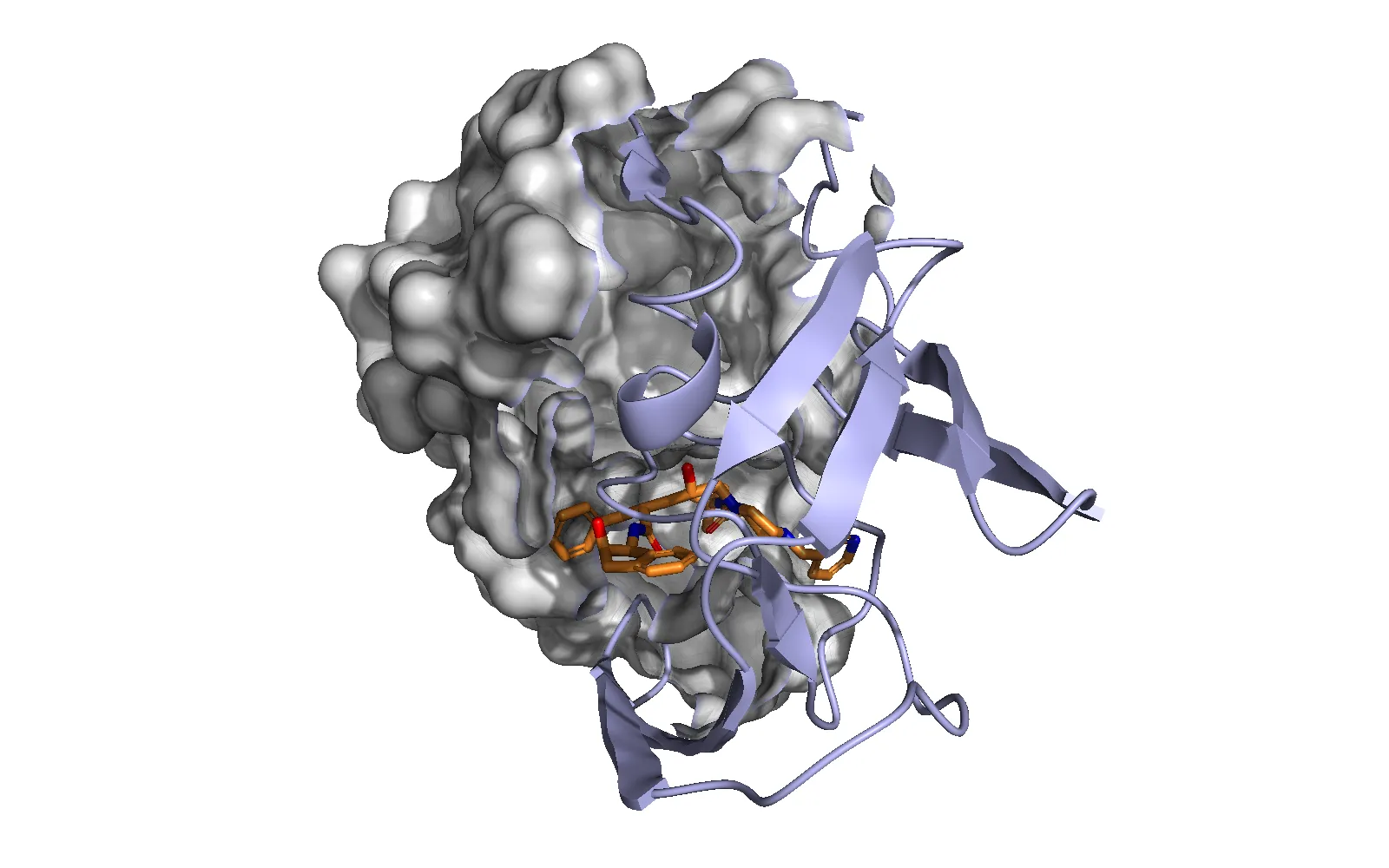 Hardware ray tracing: ray-traced ambient occlusion and cast shadows from the cartoon onto the surface.
- Ray tracing (AO + shadows) (
set metal_raytrace, 1): Traces ambient occlusion and shadow rays directly against molecular geometry. - RT hard shadows (
set metal_rt_shadows, 1): Traces crisp shadow rays from directional lights instead of sampling a rasterized shadow map. - Temporal AO (
set metal_temporal_ao, 1): Accumulates ray-traced ambient occlusion across frames while the camera is still, progressively eliminating noise without sacrificing interactive frame rates. - RT resolution & quality: Adjust the interactive ray budget with
metal_rt_scale(from 0.25 to 1.0; 0.5 traces one-quarter of the rays and relies on a bilateral blur) andmetal_rt_samples(4 to 128 rays per pixel). Image exports always trace at full resolution with a minimum of 48 rays. - AO reach & strength:
metal_rt_ao_radiussets the occlusion radius in Ångströms (default ~5 Å). Smaller radii emphasize tight crevices and contact interfaces; larger radii darken deep binding pockets and cavities.metal_rt_ao_intensityscales the darkness.
Shadows and ambient occlusion
Section titled “Shadows and ambient occlusion”- Shadows (
set metal_shadows, 1): Enables directional cast shadows. Adjust depth bias withset metal_shadow_biasto prevent self-shadow acne on curved molecular surfaces. - Ambient occlusion (SSAO) (
set metal_ssao, 1): Screen-space ambient occlusion darkens crevices and contact creases. When hardware ray tracing is active, SSAO stays enabled by default to add crisp contact creases that soft traced occlusion leaves diffuse.
Outlines and silhouettes
Section titled “Outlines and silhouettes”RayMol can overlay clean publication-style contours:
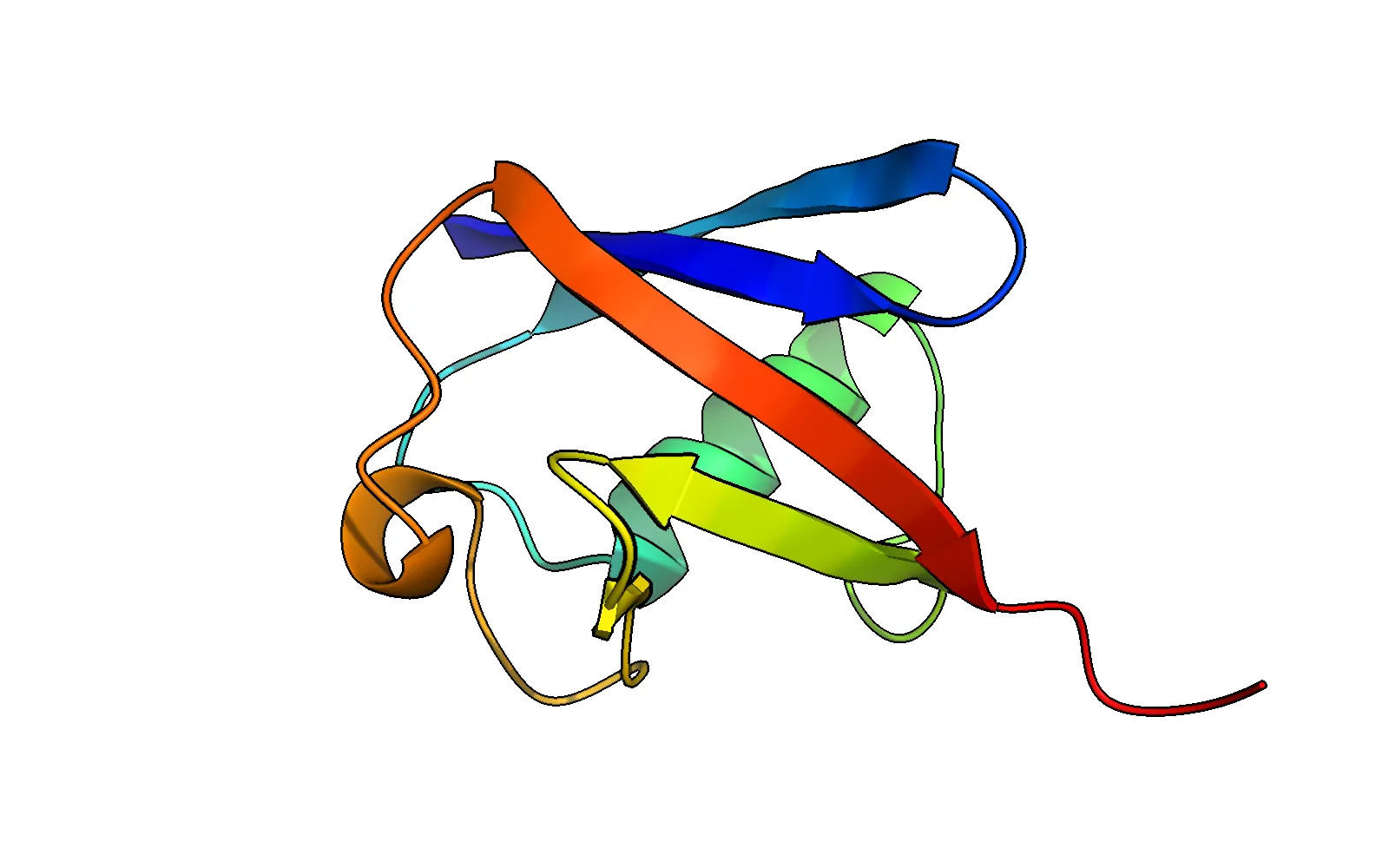 Metal outlines: a black silhouette contour drawn around the cartoon.
- Silhouette outlines (
set metal_outline, 1): Draws edge outlines around structures. Set outline thickness in screen pixels withset metal_outline_width, 1.5(range 0.5–5.0 px) and configure color withset metal_outline_color, black(or hex/RGB). - Surface contour: a crisp line around a surface’s outer silhouette,
visible even when the surface is transparent or clipped. Turn on Contour
in the object’s Surface layer (
set surface_contour, 1). Adjust it withsurface_contour_width(pixels),surface_contour_color(default: the surface colour) andsurface_contour_opaque.
Depth cueing and fog
Section titled “Depth cueing and fog”Toggle Depth cue / fog (set depth_cue, 1) under Effects to fade distant
parts of the structure into the background colour.
Transparency and peeling
Section titled “Transparency and peeling”RayMol supports order-independent transparency across surfaces, cartoons, sticks, and spheres:
- Translucent layers (peel):
set transparency_peel, 1, objectkeeps only the nearest transparent layer of an object. This prevents internal mesh clutter on translucent surfaces and eliminates visual artifacts where sticks and spheres intersect. Auto mode (set transparency_peel, -1, object) activates peeling automatically for glass-family materials. Up to three peeled objects render concurrently per frame. - RT through transparency (
set metal_rt_transparent, 1): Allows transparent representations (such as glass surfaces or translucent ribbons) to cast lighter, attenuated traced shadows (jelly darker, clear glass faint), contribute ambient occlusion in proportion to their opacity, and appear in reflections. Not available in grid mode. Because tracing through multiple transparent layers increases GPU work, keep this off for interactive exploration and enable it for exports.
Exposure and tone mapping
Section titled “Exposure and tone mapping”- Exposure (
set metal_exposure, 1.0): Global brightness multiplier (range 0.2–2.0). When a studio light rig is active, exposure scales the lit structure and atmosphere without altering the background canvas or labels. - Filmic tone-map (
set metal_tonemap, 1): Applies an ACES filmic tone curve to roll off specular highlights gracefully and preserve color saturation in brightly lit regions.
Tessellation and MetalFX upscale
Section titled “Tessellation and MetalFX upscale”- Spline ribbon (
cartoon_spline) and Flat sheets (cartoon_flat_sheets), both on by default, in each object’s Cartoon layer control ribbon curvature and beta-sheet geometry. - Surface clipping: shave the near or far side off a surface while cartoons
and sticks stay whole, using Clip front / Clip back in the Surface
layer (
set surface_clip_front, 0.5, obj; 0 = none, 1 = clip to the centre). - Reduced-res upscale (
set metal_upscale, 1): Uses Apple MetalFX upscaling to render at a lower internal buffer resolution and upscale to the display resolution, for better performance on slower GPUs or large assemblies. - Grid mode (
set grid_mode, 1): Lays out each object in its own isolated cell. In grid mode, ambient occlusion, shadows, and reflections are confined to each cell’s objects, preventing cross-cell shadow bleeding.
Export images
Section titled “Export images”On macOS, use the toolbar Export menu ▸ Save Image, or File ▸ Export Image… (⇧⌘E) to save at 2× the view size. On iPad and iPhone, use Export ▸ Share Image.
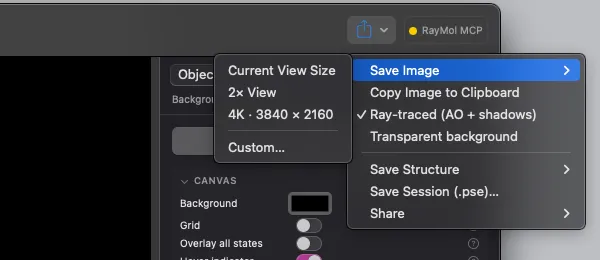 The toolbar Export menu with the Save Image size submenu.
Resolution and framing
Section titled “Resolution and framing”- Sizes: Choose Current View Size, 2× View, 4K · 3840 × 2160 (not on iPhone) or Custom… (macOS). Turn on Ray-traced (AO + shadows) to export with the Metal ray tracer.
- Transparent background: Enable Transparent background (written as PNG) to drop the canvas background. Alpha matches the molecular silhouette, preserving edge antialiasing and depth-of-field scatter halos.
- Copy to clipboard: On macOS, choose File ▸ Copy Image to Clipboard
(or press
⌘Cwhen no text field or selection is focused) to copy the current rendered viewport directly to the system clipboard.
Ray-traced export vs. classic CPU ray
Section titled “Ray-traced export vs. classic CPU ray”When preparing final figures, RayMol provides two distinct rendering paths:
| Feature | App Metal Export (Ray-traced) | Classic CPU ray command |
|---|---|---|
| Engine | Apple Metal GPU pipeline | Classic CPU software tracer |
| Studio lights & atmosphere (beta) | Full support (spotlights, haze, dust) | Unsupported (falls back to PyMOL classic lights with a notice) |
| Materials & Looks | Full shader support (glass, metal, marble, etc.) | Approximated via procedural ray_texture |
| Refractions | Screen-space refraction (stylized) | None |
| Depth of field | Scatter-based bokeh matching live viewport | None |
| WYSIWYG scaling | Outlines and DOF scale proportionally to resolution | Uses CPU ray settings |
To export an image using the Metal ray-traced pipeline from Python:
from pymol import cmd
# Export a 2400 × 1800 image with the Metal renderercmd.png("figure1.png", width=2400, height=1800, ray=0)Export molecular structures and sessions
Section titled “Export molecular structures and sessions”Save structures from the toolbar Export ▸ Save Structure menu, and sessions with File ▸ Save Session (⌘S) or Save Session As… (⇧⌘S):
- Coordinate formats: RayMol exports structures in standard formats including
PDB (
.pdb), mmCIF (.cif), SDF, MOL, MOL2, XYZ and PQR, plus VRML (.wrl) and POV-Ray (.pov) scene files. - Session files (
.pse): Preserves all loaded objects, custom selections, representations, per-object materials, camera keyframes, studio light rigs, and analysis notes. Sessions are fully portable between macOS, iPadOS, and iOS.
Export movies
Section titled “Export movies”RayMol can render animated timelines and multi-state trajectories to standalone video files:
- Formats: Video (H.264 or HEVC as MP4/MOV; ProRes 422 on the Mac), animated GIF, or a PNG image sequence.
- Background rendering: Movie export runs off the main thread, keeping the interface interactive while frames encode.
For details on building keyframe sequences, configuring scene transitions, and exporting animation tracks, see Movies & Scenes.